CryptoFlow by lag0

Liquidity vs liquidation heatmap One maps real orders. The other maps estimates.

A liquidity heatmap shows where real limit orders were resting in the order book over time, while a liquidation heatmap shows model estimates of the price levels where leveraged futures positions could be force-closed.

Search results often mix the two up. Both draw colored bands across a chart, but the data behind them is completely different.

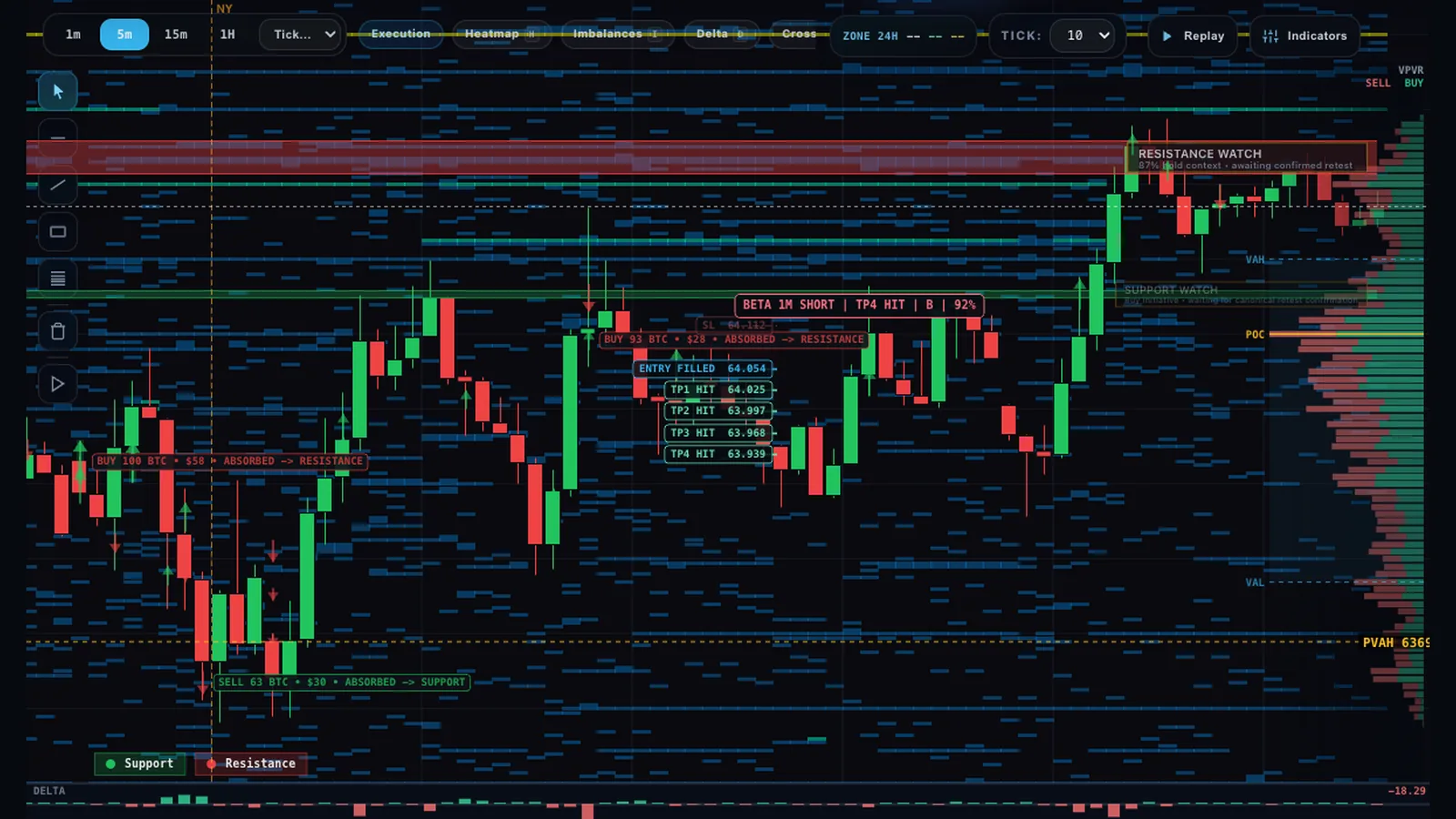
Bitcoin liquidity heatmap in CryptoFlow by lag0: resting limit orders from the order book drawn as blue horizontal bands behind BTCUSDT candles, with a visible-range volume profile on the right
Every blue band is size that was actually resting in the order book. Nothing on this chart is a liquidation estimate.

Liquidity heatmap vs liquidation heatmap at a glance

Quick test: if the number comes from the order book, it is liquidity. If it comes from open interest and leverage, it is a liquidation estimate.

Liquidity heatmap Liquidation heatmap
What it shows Resting bid and ask limit orders at each price, drawn over time. Brighter means more size waiting. Estimated price levels where leveraged longs or shorts would be liquidated.
Data source The exchange order book (depth feed). In lag0 this is the Binance USDT-M futures book. A model built from open interest, assumed leverage tiers and estimated entry prices.
Real or estimated Real displayed orders, though they can be cancelled before price arrives. Estimated. Exchanges do not publish other traders' liquidation prices.
How it updates Continuously, as orders are placed, pulled or filled. When the model reruns on new open interest and price data. Clusters fade once price trades through them.
Useful for Seeing where size is waiting and whether a wall holds, refills or gets pulled when price tests it. Seeing where forced buying or selling could add fuel if price gets there, and judging leverage risk.
Typical mistake Treating a bright wall as guaranteed support or resistance. Treating a bright cluster as a price target or a magnet.
Where to see it Order-flow platforms, including lag0 (free, in the browser). Derivatives-data sites such as CoinGlass and Hyblock. lag0 does not draw one.

How each heatmap is built

Knowing the input tells you how much weight a band can carry.

Liquidity heatmap: measured

The tool takes repeated snapshots of the order book and colors each price level by how much size rests there. Over time this shows where walls appeared, how long they stayed and whether they vanished before a test. lag0 uses the Binance USDT-M futures book.

Liquidation heatmap: modeled

The provider starts from open interest, the total size of open futures positions, and assumes how it splits across leverage tiers such as 10x, 25x or 50x. It estimates where those positions were opened and sums the implied liquidation prices per level. Example: a 20x long opened at 100,000 is wiped out by a drop of roughly 5 %, so it lands a little above 95,000.

What the model cannot see. Stop-losses, cross margin, margin added later and partial closes all move real liquidation prices. CoinGlass, for example, calls its colors relative intensity and says actual liquidations can come in lower. Providers often disagree on the same coin.

Reading them together

A liquidation map suggests where forced orders might appear. The liquidity heatmap shows what is waiting to meet them. Executed volume shows who won.

Resting bids under a long cluster

A liquidation map shows a long cluster just below price, and the liquidity heatmap shows a thick bid wall in the same area. If price arrives, forced selling either hits those bids and stalls, or the bids get pulled and the move runs through. The heatmap shows which one happens.

A cluster beyond a thin book

When little size rests between price and a cluster, forced market orders meet few limit orders and can move price further. That is a reason to watch the area closely, not a forecast that the move will happen.

Confirm with what traded

The footprint and delta show what actually executed. A wall that soaks up heavy selling without giving way is absorption, and that reaction says more than either map.
Common mistakes

The first mistake is the name: liquidation maps often get called liquidity heatmaps. If the legend mentions open interest, leverage or estimates, it is a liquidation map.

With a liquidity heatmap

  • Treating every bright wall as support or resistance
  • Forgetting that walls can be pulled or spoofed before the test
  • Reading resting orders as if they had already traded
  • Assuming one exchange's book is the whole market

With a liquidation heatmap

  • Treating a bright cluster as a price target or magnet
  • Trusting exact levels when different models disagree
  • Checking it once, although it changes as positions open and close
  • Placing leveraged entries or stops inside a large cluster

FAQ

What is a liquidation heatmap?

A liquidation heatmap is a chart of estimated price levels where leveraged futures positions would be force-closed. It is built from a model of open interest, leverage and likely entry prices, not from real orders. Brighter bands mean a larger estimated cluster.

What is the difference between a liquidity heatmap and a liquidation heatmap?

A liquidity heatmap shows real limit orders resting in the order book over time. A liquidation heatmap shows estimated levels where leveraged positions could be liquidated. The first is measured from the exchange, the second is modeled.

Are liquidation heatmaps accurate?

They are rough estimates. Exchanges do not publish other traders' liquidation prices, so every map rests on assumptions about leverage and entries, and different providers show different clusters for the same coin. Use them to see where risk may sit, not as exact levels.

Do liquidation clusters act as price magnets?

Not reliably. Price can run into a cluster and trigger it, but it can also turn before it, and the cluster can shrink as traders close positions or add margin. Treat a cluster as an area to watch, then check what actually trades there.

Where can I see a free Bitcoin liquidity heatmap?

The CryptoFlow workspace by lag0 shows a free liquidity heatmap for BTC, ETH and SOL perpetuals in the browser, built from the Binance USDT-M futures order book. The live chart opens without an account. lag0 does not draw a liquidation heatmap.

See a live liquidity heatmap

lag0's CryptoFlow workspace draws the liquidity heatmap next to the footprint, delta and volume profile for BTC, ETH and SOL perpetuals. It is free, and H toggles the heatmap. For walls, pulling and the DOM, read the BTC order book heatmap guide.

About liquidations in lag0. lag0 does not draw a liquidation map. Its server records actual liquidations from the public Binance, Bybit and OKX feeds and passes recent totals to the AI Analyst as context; they are not drawn on the chart. Research, not investment advice: see the risk notice.

See resting liquidity in the actual chart.

Watch whether a wall holds, refills or gets pulled when price reaches it.

Open workspace